
Introduction
This document explains how to subscribe to, receive, verify, and process webhooks generated by the system. It is intended for developers and integration partners who want to consume real-time event notifications such as customer creation, customer updates, job creation, and other operational events.
What Are Webhooks?
Webhooks are HTTP callbacks that notify your system when specific events occur. Instead of polling APIs for changes, your application receives near real-time notifications whenever subscribed events happen.
Examples of currently supported events include:
- Customer created
- Customer status changed
- One-time job created
- One-time Job Deleted
- One-time Job schedule Changed
- Technician Route Changed
High-Level Delivery Model
- A business event occurs in the system (e.g., customer created).
- A background worker delivers the webhook to your endpoint.
- Delivery status is tracked and retried if needed.
Subscribing to Webhooks
Set-up Instructions
- Navigate to Settings: Log in to Pool Brain and go to Settings > API > Webhooks
- Activate the “Use Webhooks” toggle setting
- Add Endpoint URL: Enter your HTTPS URL (e.g.,
https://api.yourdomain.com/webhooks) - Select Events: Subscribe to the specific events you need (e.g.,
customer.created,job.one_time.created).
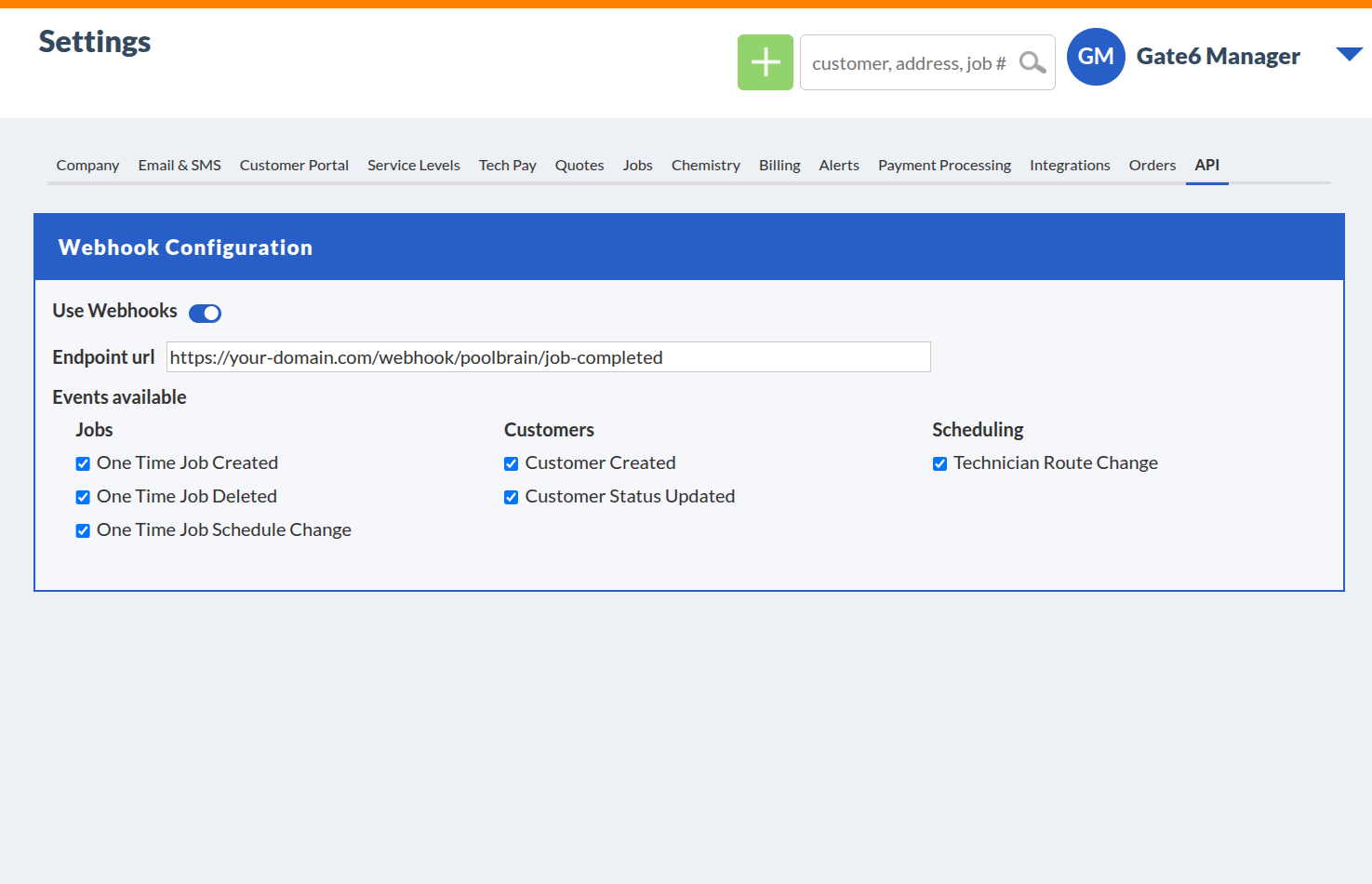
Settings > API > Webhooks — Example dashboard view
Subscription Details
Webhook subscriptions are configured per company and define:
- The HTTPS endpoint where webhooks will be delivered
- Which events do you want to receive
- A shared secret used for signature verification
Only explicitly subscribed events will trigger webhook notifications.
Webhook Events
Each webhook corresponds to a specific event type.
Event Naming Convention
Event names follow a dot-separated, past-tense format:
This naming convention ensures consistency and future extensibility.
Webhook Payload Structure
All webhooks use a consistent JSON envelope. The data attribute contains the specific event details.
Field Reference
| Field | Type | Description |
|---|---|---|
id |
String | Unique UUID for this specific webhook delivery |
event |
String | The name of the event (e.g., customer.created) |
company_id |
Integer | The ID of the company where the event originated |
timestamp |
String | UTC timestamp of when the event occurred |
data |
Object / Array | The event payload. For grouped events, this will be an Array. |
Standard Payload (Single Event)
By default, events are delivered individually.
{
  "id": "af1edcbb-4622-4653-8ee1-4cb9b2d242bd",
  "event": "customer.status.updated",
  "company_id": 40,
  "timestamp": "2026-02-13T06:42:24.705000Z",
  "data": {
    "customerId": 3930000,
    "displayName": "Chris Bale",
    "currentStatus": "inactive"
  }
}
Grouped Payload (Batched Events)
Used when multiple events of the same type occur simultaneously (e.g., Bulk Imports,one time route move) to reduce network traffic. Your integration must be able to handle data as an Array for grouping events.
{
  "id": "ddb2ecfe-c4e0-4536-8f00-ccbfbd40af0b",
  "event": "job.one_time.schedule.changed",
  "company_id": 40,
  "timestamp": "2026-02-13T07:12:50.910000Z",
  "data": [
    {
      "jobId": 2493251,
      "jobTitle": "Filter Clean",
      "technicianName": "Alina Grant",
      "currentRouteName": "North Route"
    },
    {
      "jobId": 2493495,
      "jobTitle": "Pump Repair",
      "technicianName": "Alina Grant",
      "currentRouteName": "North Route"
    }
  ]
}
Customer Events
Triggered when a new customer is created manually, via import, or sync.
Payload data:
{
  "customerId": 1001,
  "displayName": "John Doe"
}Triggered when a customer status changes (e.g., Active to Inactive status, Lead status, or any other status).
Payload data:
{
  "customerId": 1001,
  "displayName": "John Doe",
  "currentStatus": "inactive"
}
Possible values for currentStatus: active, inactive, lead
Job Events
Triggered when a one-time job is Created.
Payload data:
{
  "jobNumber": "JOB-5501"
}Triggered when a one-time job is permanently deleted.
Payload data:
{
  "jobNumber": "JOB-5501",
  "jobTitle": "Filter Cleaning"
}Triggered when a one-time job is moved, re-routed, or unscheduled.
Payload data:
{
  "jobId": 2493251,
  "jobTitle": "Untitled Job",
  "technicianName": "Sourav Bhange",
  "currentRouteName": "North Route - Truck 1"
}
Route Events
Triggered when a technician is assigned or unassigned from a route.
Payload data:
{
  "technicianFirstName": "Mike",
  "technicianLastName": "Smith",
  "routeName": "North Route - Truck 1"
}
Webhook Security
HTTPS Requirement
To ensure that webhook requests originate from Pool Brain and not a malicious third party, every request includes a signature header. You must verify this signature before processing the data.
The Signature Header
Every request includes the HTTP header:
X-Webhook-Signature: <HMAC-SHA256 hash of the request body>How to Verify
- Capture: Obtain the raw bytes of the request body.
- Hash: Hash the body using HMAC-SHA256 and your unique Signing Secret (found in your Webhook set-up).
- Compare: Compare your generated hash with the value in the
X-Webhook-Signatureheader. If they match, the request is legitimate.
Python Example
import hmac
import hashlib

def verify_signature(request_body, signature_header, secret):
    # Ensure secret is bytes
    secret_bytes = secret.encode('utf-8')

    # Generate hash
    expected_signature = hmac.new(
        secret_bytes,
        request_body,
        hashlib.sha256
    ).hexdigest()

    # Secure comparison to prevent timing attacks
    return hmac.compare_digest(expected_signature, signature_header)
Retry & Failure Handling
If a webhook delivery fails due to network errors, timeouts, or non-2xx HTTP responses, the system automatically retries delivery.
Retry Schedule
- Initial attempt
- Retry after ~5 minutes
- Retry after ~10 minutes
- Retry after ~30 minutes
If all retries fail, the event is marked as permanently failed.
Expected Responses from Consumer
To acknowledge successful delivery, your endpoint must return:
Any other response is treated as a failure and will trigger a retry.
Best Practices for Consumers
- Always respond quickly (within a few seconds)
- Webhook endpoint will accept
application / jsoncontent type - Process webhooks asynchronously
- Do not perform long-running tasks in webhook handlers
- Log received event IDs
- Implement idempotency
- Validate signatures on every request
Versioning & Backward Compatibility
Webhook payloads are versioned implicitly by event type and structure.
Breaking changes will:
- Introduce new event types
- Never modify existing payloads without notice
This ensures backward compatibility for existing consumers.
Monitoring & Troubleshooting
What to Monitor
- Delivery frequency
- Duplicate events
- Failed processing attempts
Contact Support
If webhook issues are suspected, contact support with:
- Event ID
- Timestamp
- Endpoint URL
Summary
This webhook framework provides a secure, scalable, and reliable mechanism for receiving real-time event notifications. It follows industry best practices and is designed to support high volume, fault tolerance, and long-term extensibility.
This document serves as the official guide for webhook consumers and should be reviewed and approved before enabling production integrations.